
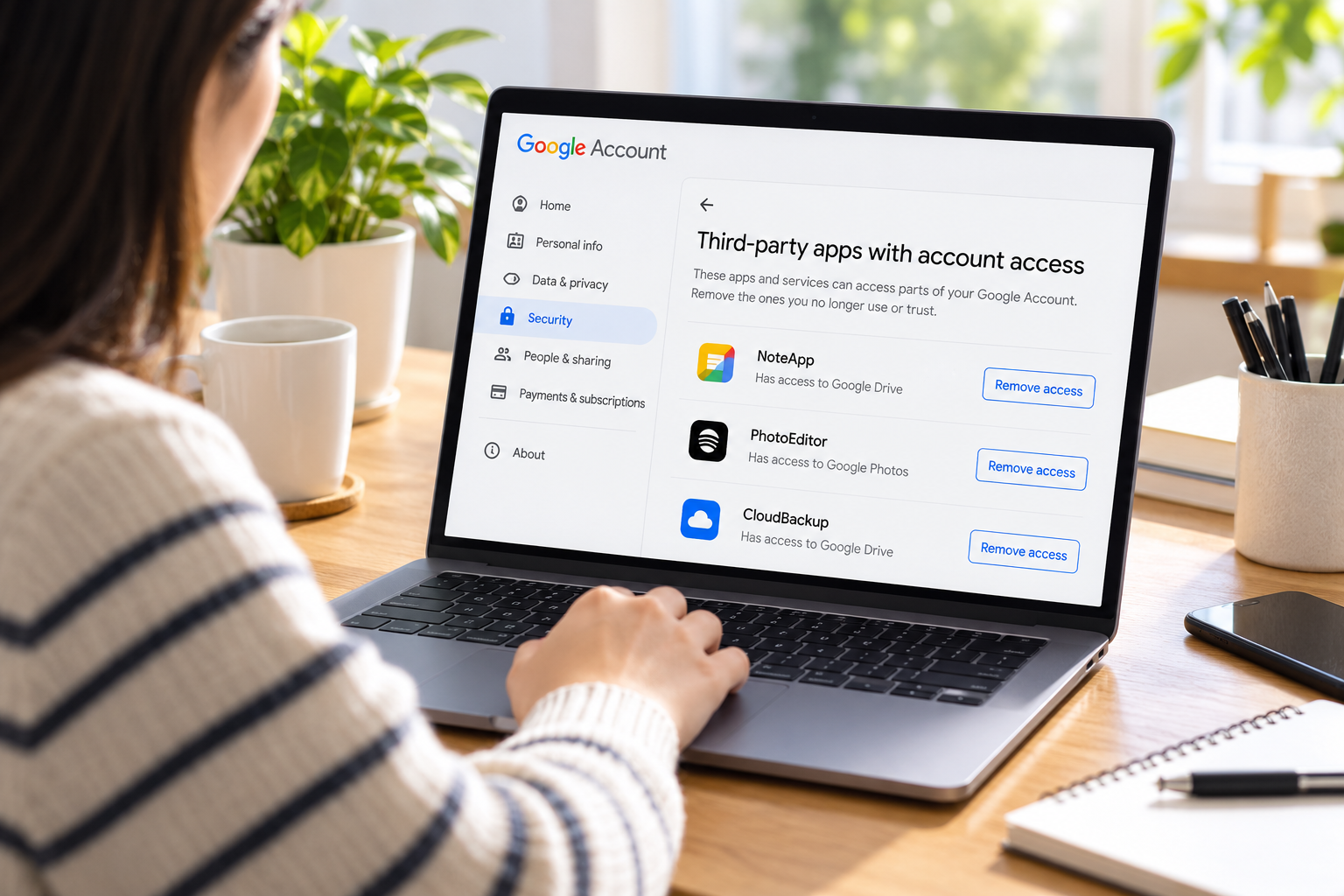
An app you stopped using may still have permission to work with information in your Google Account. To withdraw that permission, visit your account’s connections page, inspect the app’s entry, and use Remove access. You will be asked to confirm the change.
Check what you are disconnecting before proceeding. A service might use Google to verify your identity, request permission to work with your files, or have both arrangements. Each connection needs its own review.
Start With the Account You Used
Open the Google Account connections page. Sign in when prompted, then check the email address shown for the selected account.
If you have several accounts, consider which one you chose when setting up the service. A connection approved through a work account will not necessarily appear when you inspect your personal account.
Before removing a service you plan to keep, find out how you will log in afterward. Look in that service’s account settings or ask its support team whether another sign-in method is available. Some services do not allow different login methods for the same account.
Find the Permission You Want to Withdraw
On the connections page, choose Access to your Google Account, then open the relevant app and select See details. Read the entry before deciding what to remove.
Focus on two questions: which information is involved, and what may the app do with it? A permission to read information is different from one that permits changes. Depending on the authorization, an app may be able to copy records or create, edit, and delete content.
Permission is limited to what you authorize. Access to Calendar alone, for instance, does not also grant permission to browse your Photos. Google’s explanation of account-data sharing describes these access levels.
Use the listed permissions to assess whether the connection still serves a purpose:
- Which task would stop working if I disconnected this service?
- Does that task require the information listed here?
- Have I finished the project or activity for which I authorized it?
- Can I identify the developer and understand its data-handling policy?
If you cannot explain an entry, investigate it before approving any further requests. An unfamiliar label alone does not establish that someone has broken into your account.
Confirm Removal of Data Access
Once you have checked the app and its permissions:
- Choose Remove access in its details.
- Select Confirm when asked.
When several relationships are shown for one service, locate the entry describing that service’s permission to use your Google Account information. Inspect any other relationships separately; they may serve a different function.
A feature that relies on the withdrawn permission may become unavailable. Google’s connection-management instructions provide the current procedure. Consult them if the labels on your screen differ.
Check Whether Another Kind of Connection Remains
The same app can appear in more than one category. The wording on its details page helps you determine which relationship you are reviewing.
When Google Is Used to Sign In
With Sign in with Google, the service receives identifying details, including your email address, account name, and profile image. Those details help it recognize your account. Sharing an email address for identification does not itself authorize the service to read the messages in that mailbox.
To disconnect this sign-in relationship, open its details under Sign in with Google, choose Stop using Sign in with Google, and confirm. Check for additional permissions if you also want to withdraw access to account data.
When Google Connects to Another Service
A Linked account entry concerns Google’s access to an account you hold elsewhere. For example, a music-service connection can allow you to request music through Google.
To end that relationship, find the section explaining Google’s access to the other service, open See details, and choose Delete link, followed by confirmation. Features depending on that link will no longer be available.
Deal Separately With Information the App Already Holds
Disconnecting an app does not bring back information it previously collected. A contacts tool, for example, may have obtained a copy while it was authorized. Withdrawing permission does not demonstrate that the developer erased that copy.
For information already held by the service, use its privacy controls or contact its support team to ask about deletion. Read its policy to understand the process and what the request covers.
Closing the service’s account is another action to consider separately. Your login with that provider is distinct from your Google Account. According to Google’s troubleshooting guidance, deletion practices vary: a provider may disable the account or delete its data.
Even after closing the provider’s account, inspect the connections page. Google explains that the provider may leave the link in place without notifying Google that the account was deleted.
Investigate Problems Beyond the Connection
If the service is missing from the list, recheck the selected Google Account and inspect the other connection categories. An entry used for signing in can be listed separately from permissions involving account information.
For software installed in your browser, examine its browser extension permissions too. That review addresses what the extension is allowed to do while you browse.
If you suspect someone else has entered your Google Account, use Google’s account-security recovery procedure. Check recent security activity, inspect the devices using the account, and follow the instructions for anything you did not authorize.
The recovery procedure also addresses exposed passwords, changes to recovery information, and two-step verification. Disconnecting an app is only one part of investigating suspected account compromise.
The Fappelo Online Safety Guide explains the password and authentication concepts involved in that wider review.
Finish With a Clear Understanding of Each Connection
Keep a connection only when you understand its purpose and are comfortable with its permissions. Before withdrawing one, check how the change affects a service you still need. Afterward, handle requests about stored information directly with the provider.







One Comment